
네이버 - NAVER
NAVER Corp.Books & Reference
3.51.08K Reviews
- Version
- Varies With Device
- Installs
- 100.00M
- Age Rating
- Everyone
Screenshots
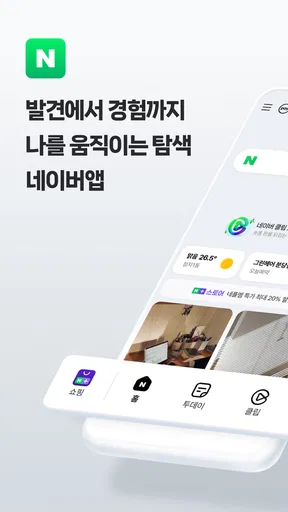


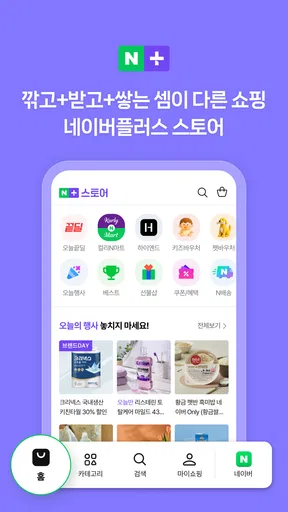

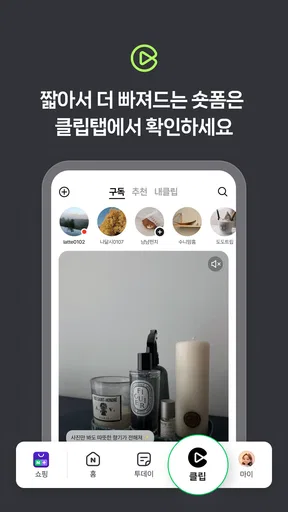
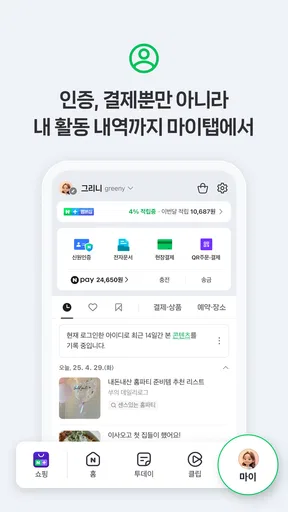
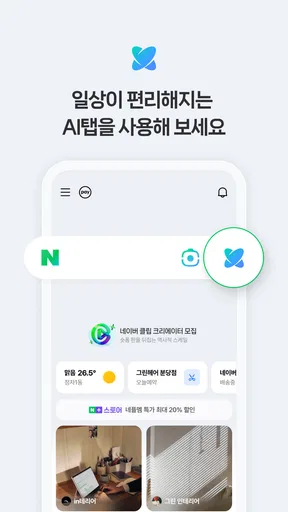
Our Review of 네이버 - NAVER
 Analysis by Appyee
I tend to judge a portal app by a simple question: does it save me time without making me feel trapped in its own ecosystem? 네이버 - NAVER is built around bringing search and several kinds of everyday content into one place. That makes it appealing if you like a single starting point for looking things up, catching up on news, or exploring community posts. It is free to download, though the real value depends on which services you actually use and whether the app’s mix suits your habits.
A portal that works best as a daily starting point
NAVER is a free Books & Reference app from NAVER Corp., and its broad reach is easy to see: it has more than 100 million installs and an average rating of 3.5 from around 548,000 ratings. It is rated for Everyone. Those figures suggest a familiar, widely used service, but they don’t guarantee that every part will fit every reader. I’d think of it less as a single-purpose reference tool and more as a gateway to a collection of services.
What the free access is worth
There’s no purchase price to weigh before trying it, which makes a quick test worthwhile if you want a search-and-content hub. Free access can be valuable when it replaces several separate stops in your routine: search for a topic, scan current stories, then continue into blogs or community material. The benefit is convenience, not a promise that every service will be useful to you.
I would not treat “free” as a reason to move every digital task into NAVER automatically. If you already have a search app, a news reader, an email app, and a translation tool that each do their jobs well, switching can add more adjustment than value. The sensible approach is to try the parts you need and keep your existing tools for anything the portal handles less comfortably.
Search and content in the same place
The central appeal is the combination of search with material to browse. Search is useful when I have a question and want to move from a quick answer toward related reading. News and blogs serve a different purpose: they help when I’m exploring a subject without knowing exactly what to ask. Keeping both modes nearby makes the app more flexible than a basic search-only utility.
That combination also calls for a little judgement. Search results, news items, blog posts, and community contributions are not interchangeable sources. When a detail matters, I use the app to find leads and then check the original publisher or another reliable reference. For casual discovery, the mix is convenient; for research that needs careful sourcing, convenience should not replace verification.
Useful ways to fit it into a routine
A practical setup is to decide what you want the app to do before opening it. For example, I might use search for a specific question, then leave rather than letting a feed turn a short lookup into an extended scroll. On another visit, I might open it deliberately to browse news or blogs. Separating those intentions helps a broad portal feel like a tool rather than an endless stream of distractions.
It can also help to treat the home screen as a workbench. The app offers a customizable home screen, so I would put the services I reach for most where they are easiest to find and avoid giving space to sections I rarely use. That small bit of setup can make a multi-service app feel more personal, while keeping the first screen from becoming a collection of shortcuts with no clear purpose.
Picture a morning when I want to check a headline, look up a name mentioned in it, and read a related blog post. NAVER’s mix can make that sequence feel natural because I can move among those kinds of content without starting from scratch in another app. If I only want a clean list of headlines, though, a dedicated news reader may be easier to scan and less likely to pull me into unrelated material.
Where it compares well—and where it doesn’t
Against a standalone search app, NAVER’s advantage is breadth: it can lead from a query into news, blogs, and communities. Against a dedicated email client or translator, the appeal is having another service close at hand rather than necessarily getting the deepest specialist workflow. I’d choose a focused app when that one task is central to my day; I’d choose NAVER when I want a broad entry point and appreciate moving between different kinds of information.
The community side is another distinction. Following creators and reading blogs can make the experience feel more participatory than a conventional search page. That is useful when I want perspectives and ongoing posts around an interest. It is less suitable when I need a quiet, tightly curated reference experience, since community content reflects a wider range of voices and calls for more active selection.
Trade-offs to consider before relying on it
A multi-service app inevitably asks the user to make choices. More sections can mean more browsing, and the service that is most useful will vary from person to person. Someone who only needs occasional definitions may find a lighter reference app quicker. Someone who wants to keep email, news, search, and reading fully separate may prefer individual apps with simpler purposes.
Language and familiarity matter too. NAVER is a Korean service, and its short description is in Korean. If you are comfortable navigating Korean-language services, that context may feel natural; if you are not, check the interface and the content you need before making it part of a daily routine. The app is not automatically the easiest option for every international user simply because its main functions sound familiar.
I also wouldn’t assume that a search result or community post is the final word on a sensitive topic. For health, financial, legal, or other consequential questions, use the app to locate information, then confirm it with authoritative sources. That is not a flaw unique to NAVER; it is a sensible boundary for any broad search and content platform.
Who is likely to get the most from it?
I’d recommend giving NAVER a try if you like discovering information across search, news, blogs, and communities, and you want those activities close together. It may suit people who already use NAVER services or readers who enjoy following creators alongside more direct searches. Its age rating is Everyone, but the best fit still depends on how comfortable you are with the language and with a portal that brings different content formats together.
I’d skip it, or keep it as a secondary option, if you want a minimalist reference app, a dedicated email workflow, or a news experience with strict editorial curation. It is also not the obvious choice if you prefer every task to stay in its own app. In those cases, a specialist alternative can reduce distractions and make it clearer where a particular kind of information comes from.
A measured recommendation
NAVER has been available since February 25, 2010, and it has accumulated around 1,100 reviews alongside its large audience. That history and reach make it a familiar portal, but neither popularity nor a 3.5 average tells me whether it belongs on your home screen. I’d judge it by a short, practical trial: use search, explore the content you actually care about, and see whether the home screen can be arranged around your routine.
For me, the strongest reason to keep it is the convenience of moving between a query and related reading without treating those as separate activities. The main caution is the same breadth: it can be more than you need, and broad discovery is not the same as a focused, authoritative reference. If you want a flexible hub and are happy to choose your own sources, the free app is worth trying. If you want one precise tool with minimal extras, I’d choose a specialist instead.
So, what exactly does 네이버 - NAVER offer? Well, it's not just a search engine. Imagine having a single platform where you can access a slew of services like news, blogs, email, and even a translator. It's like having a personal assistant in your pocket that’s ready to help you tackle the day.
User Interface and Design
First impressions matter, and the app doesn’t disappoint. The interface is sleek and intuitive, making it easy to navigate through its plethora of features. Everything is neatly organized, so you won't find yourself lost in a sea of options. Even if you're a first-timer, the learning curve is almost non-existent.
Features Galore
Let's break down some of the key features that make this app stand out:
- Search: The search functionality is incredibly robust, providing results that are not only relevant but also timely.
- News: Stay updated with real-time news from various categories. Whether it's politics or pop culture, you'll find it here.
- Email: Manage your emails efficiently with NAVER's integrated email service.
- Translator: Traveling or learning a new language? This feature will be your best friend.
- Blogs and Communities: Engage with content from diverse communities and blogs without leaving the app.
Performance and Reliability
When it comes to performance, NAVER is a champ. The app loads quickly, and transitions between different functionalities are smooth. You won't find yourself frustrated with lag or downtime, which is a huge plus for anyone relying on it for daily tasks.
Personal Experience
I’ve been using the app for a while now, and what I love most is how it seamlessly integrates into my daily routine. Whether I'm checking the latest news over breakfast or translating a phrase during a meeting, it’s all about convenience. One feature I found particularly useful is the customizable home screen, allowing me to prioritize what’s important to me.
The Community Aspect
One of the unique facets of NAVER is its community-driven content. It's similar to a social network but with a more focused approach. You can follow creators, engage with their content, and even start your own blog. It's a great way to connect with like-minded individuals and share your interests.
Why You Should Try It
If you're looking for a reliable, feature-rich app that keeps you informed and organized, give 네이버 - NAVER a go. It's like having multiple apps rolled into one, saving you space and time. Plus, with its clean design and user-friendly interface, it’s accessible to everyone.
In conclusion, 네이버 - NAVER is more than just an app; it's a digital lifestyle solution. Whether you're tech-savvy or just getting started with smartphones, you'll find it an invaluable tool for navigating the digital world. So why wait? Download it today and see for yourself the convenience it brings to your fingertips.
Verdict
Strengths of 네이버 - NAVER
- Intuitive user interface, easy to navigate.
- Extensive range of features and tools.
- Fast and reliable search engine.
- Seamless integration with other services.
- Regular updates enhance functionality.
Limitations of 네이버 - NAVER
- App can be resource-intensive on devices.
- Some features may require a learning curve.
- Occasional ads can be intrusive.
- Limited offline functionality.
- Certain features are region-specific.
Other Releases by NAVER Corp.
View All
BAND - App for all groups
Social4.8

PRISM Live Studio: Games & IRL
Video Players & Editors4.3
Similar Picks in This Category
View All
Google Play Books & Audiobooks
Google LLC4.7

Wattpad - Read & Write Stories
Wattpad.com3.7

King James Bible - Verse+Audio
Ozion4.8

Bible Offline-KJV Holy Bible
Bíblia Offline4.9

Amazon Kindle: Reading App
Amazon Mobile LLC4.8

Audible: Audiobooks & Podcasts
Audible, Inc.4.6
Frequently Asked Questions
What is 네이버 - NAVER used for?
네이버 - NAVER is a comprehensive app that serves as a search engine, news portal, and social platform. It offers a variety of services including web search, news updates, blogs, e-commerce, and more. It's widely used in South Korea, making it a versatile tool for accessing information and connecting with others.
Is 네이버 - NAVER available in languages other than Korean?
While 네이버 - NAVER primarily caters to a Korean-speaking audience, some features are available in other languages. However, the majority of its content and services are optimized for Korean users. Non-Korean speakers might find the interface challenging unless they use translation tools.
Does 네이버 - NAVER offer privacy and data protection?
네이버 - NAVER takes user privacy seriously, implementing various security measures to protect personal data. Users can customize privacy settings and manage data sharing options. It's important to review these settings to ensure your information is handled according to your preferences.
Can I use 네이버 - NAVER for e-commerce and online shopping?
Yes, 네이버 provides e-commerce services through its platform, allowing users to shop online, compare prices, and read reviews. It includes features like NAVER Shopping, which aggregates products from various retailers, making it a convenient tool for online shoppers in South Korea.
Is 네이버 - NAVER free to use, and are there any ads?
네이버 - NAVER is free to download and use. However, like many free apps, it includes advertisements. These ads help support the free services provided by the app. Users can choose to ignore them or explore premium options if available, to minimize ad exposure.
